
Create Better Video Mockups for Campaign Planning with Seedance 2.5
Video mock-ups are vital to test campaign concepts before committing to production. Discover how Seedance 2.5 and Pippit make creating realistic mockups easier.

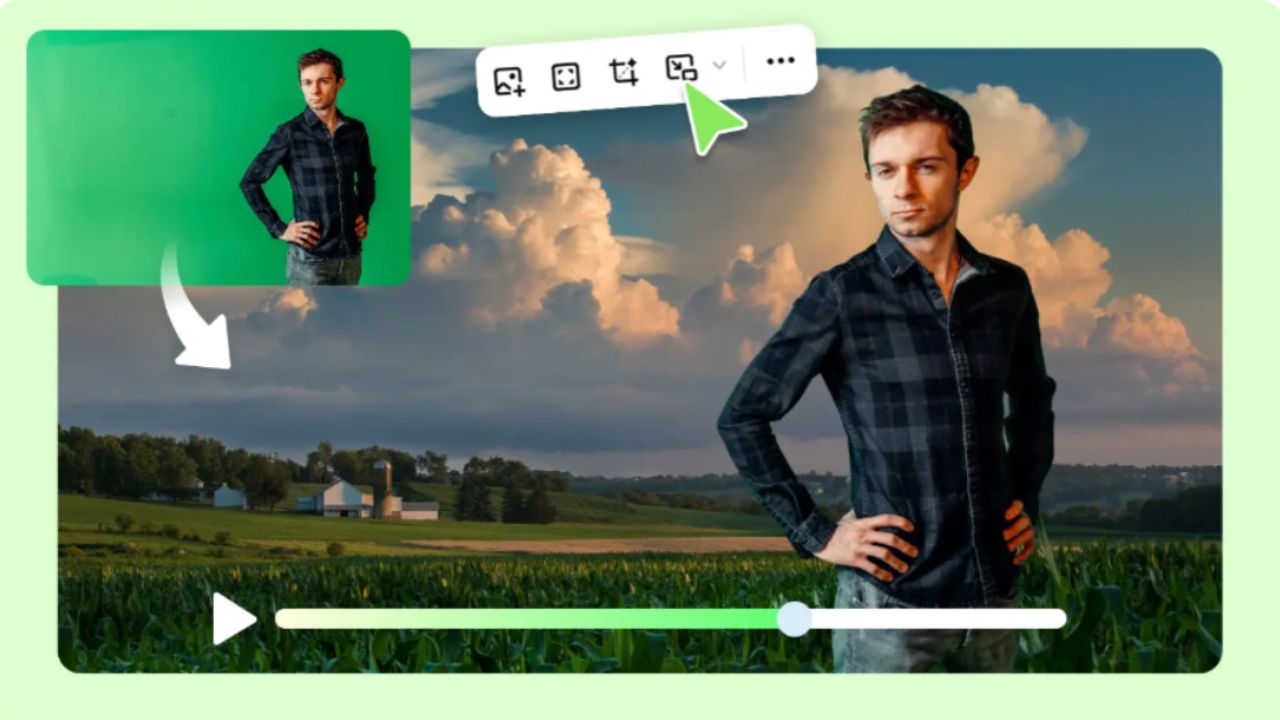
Image generated by AI
Video mock-ups are used to test campaign concepts before committing to costly production. The early visualization helps to plan, creative alignment, and communication among stakeholders. Pippit makes this easier by creating realistic videos from prompts and reference materials using AI. The use of features like reference guidance, scene control, and detailed visuals makes concept development more efficient. This article shows how video mockups help in campaign planning, boost creative accuracy and can be polished previews for marketing projects.
Why Video Mockups Improve Campaign Planning
Video mockups are used to turn the written concept into a visual concept prior to production. Early previews can flag up storytelling gaps, composition problems, and inconsistencies with branding. Marketing teams can compare a number of creative directions without having to set up locations, gear or talent. Visual demonstrations enhance communication with internal review and client presentation. Decision-makers can grasp the campaign goal faster by viewing moving images versus still images. Alternative scene variations are more easily evaluated prior to application of production resources. The quicker the approval, the less opportunity for revisions, which boosts project efficiency. All campaigns are more creatively aligned as all participants see the same visual direction from the start.
Seedance 2.5 Features That Enhance Campaign Video Mockups
Advanced generation features enable a realistic visualization of campaign planning, which makes it more reliable. Continuous video generation is not a series of moments but a series of connections. Timestamp prompts structure key story beats with a progress of scenes. High-fidelity visuals enhance lighting, textures, movement and the appearance of the subject for convincing previews. Multi-modal references are consistent with their branding, using images, video, or design materials uploaded. Green screen editing makes the background replacement after generation easier, allowing for more flexibility in creative across a variety of campaign environments. Extension for footage in finished scenes to longer concepts, without having to restart the generation process. These features assist in getting early campaign concepts into compelling visual drafts that can be used for planning discussions. Seedance 2.5 enhances this workflow with structured scene control, realistic rendering and consistency controlled by reference in the same creative process.
Steps to Create Better Video Mockups for Campaign Planning with Seedance 2.5
Step 1: Set up your campaign video concept
- Sign up for Pippit and access the home page.
- Select "More" from the left vertical menu bar and choose "Video generator".
- Enter a text prompt that outlines the campaign style, tone, and camera angles you want to visualize.
Step 2: Generate your campaign mockup
- Click "+" and upload the image, video, file, or link for your campaign mockup.
- You can also click "Upload a reference video" and choose "Upload" to import a sample video, allowing the AI to follow its style.
- Select "Dreamina Seedance 2.5" from the available models.
- Specify the video length, language, and aspect ratio.
- Click "Generate," and Pippit produces a campaign-ready video mockup from your prompt.
Step 3: Review and export the mockup
- Select the generated mockup and press the Play button to review it.
- Click "Edit more" to crop the video, stabilize footage, adjust colors, or modify the background.
- Click "Download" to save the mockup or "Publish" to share it directly on your social media.
Elements That Make Campaign Video Mockups More Effective
Successful campaign mockups combine several essential visual elements that strengthen communication and creative consistency.
- Set one clear campaign goal per scene.
- Use consistent colors, styling and recognizable visual identity.
- Elevate products with natural visual emphasis from realistic angles.
- Apply deliberate framing of the camera to direct viewers' attention effectively.
- Create scenes and sequence events in a logical manner between key moments.
- Conduct a memorable conclusion frame in the direction of the campaign.
Each element strengthens the video's overall clarity while keeping every scene connected to the intended marketing message.
Using References in Pippit for More Accurate Campaign Visuals
Reference materials help to create continuity in AI-generated campaign videos. Product images easily upload recognizable packaging, shapes, colors and design details in multiple scenes. Campaign color palettes will ensure that ads, landing pages, and promotional materials are all visually consistent. Camera placement, framing and the placement of subjects are influenced by composition references for continuity. Character references produce a uniform appearance in a series of connected sequences, avoiding differences in visual appearance. These assets also support creative direction pre-export as the generated scenes are closer to the concept that the campaign was based on. Accurate references minimize revisions and create better previews for internal review and client presentations.
Structuring AI Prompts for Campaign-Oriented Video Mockups
Good prompts provide a clear creative direction prior to generation. Firstly, define the campaign goal, and then make sure all the scenes communicate a single message. Order scenes sequentially and make logical transitions from beginning to middle to end. Provide camera directions where framing, tracking, and close-up shots have an impact on storytelling. Use direct rather than vague words to define mood, lighting, environment, and behavior of the subject. Talk about key visual elements like product shots, logos, or framing before secondary elements. Be sure to carefully read through the completed prompt to eliminate any conflicting instructions that could compromise the accuracy of the generation: predictable results and easier editing inside Pippit with well-structured prompts.
Refining Video Mockups Using Pippit's Editing Tools
Editing converts generated mockups to polished campaign previews for presentations and marketing discussions. Green screen editing allows you to swap out simple backgrounds for environments that correspond to various campaign concepts. Colour corrections enhance scene consistency and brand consistency. Stabilization tools smooth out generated footage for cleaner movement and more professional-looking footage. Cropping options maximize the video content for different types of publications, such as vertical and horizontal. Final export settings retain appropriate quality for reviews, presentations and previews for social media. Each visual element is carefully refined to ensure that it helps achieve the campaign goal and that it is consistent throughout the finished mockup.
Conclusion
Realistic video mockups can be used to facilitate creative discussions prior to video production, making campaign planning more efficient. Early visualization helps communicate, minimizes revision and enhances decision-making during development. Pippit brings together AI video generation, consistency with reference, scene refinement and flexible editing tools in a single creative process. These abilities enable marketing teams to create more refined campaign previews, test out several ideas in an efficient manner and have better visual guidance before entering into full production.
Related Travel Guides
Smart Delegate Cards: AI & NFC Digital Identity for Business Events
Boston Mindtrip & WhatsApp AI Trip Planning for FIFA World Cup 2026
Best AI Video Generators for Marketing Campaigns, According to Reddit
Disclaimer
This article is for informational and educational purposes only. It does not constitute legal, financial, or professional advice. While we strive to provide accurate and up-to-date information, travel policies, regulations, and conditions change rapidly. Always verify information with official sources before making travel decisions. Nomad Lawyer makes no representations about the accuracy, reliability, completeness, or suitability of the information provided. Readers should consult qualified professionals for advice specific to their circumstances. The views expressed in this article are those of the author and do not necessarily reflect the views of Nomad Lawyer.
Preeti Gunjan
Contributor & Community Manager
A passionate traveller and community builder. Preeti helps grow the Nomad Lawyer community, fostering engagement and bringing the reader experience to life.
Learn more about our team →