Turning Rough Concepts into Polished Images with AI
Transform messy mood boards, rough sketches, and scattered ideas into clean, professional visual assets using AI image generation tools.

Screenshot of Dreamina AI image generation workflow
A messy mood board, a handful of reference photos saved from different websites, or a voice memo spoken on the go—most creative projects start out looking nothing like their final form. That gap between a rough concept and a polished visual is where many good ideas quietly stall. An AI image generator exists specifically to close that gap, taking something unfinished and shaping it into a clean, presentable image.
Dreamina, powered by its advanced image generation model Seedream 5.0 Pro, is particularly effective at this kind of refinement work. It doesn't require a perfectly written brief to produce a polished result; it simply needs enough direction to understand where you're headed.
What Counts as a Rough Concept in Creative Work?
Rough concepts come in more forms than people usually realize. It might be a single evocative sentence, a collage of unrelated reference images, a half-finished napkin sketch, or even just a strong feeling about a mood you want to capture without concrete details yet.
None of these are failures—they are all valid starting points. Part of the modern creative process is recognizing that a rough concept doesn't need to be fully formed before you start generating and testing ideas.
The Mindset Shift: Iterative Refinement Over First-Try Perfection
The biggest hurdle for many creators is not the tool itself, but the expectation that a first generation should be near-perfect. Treating your initial image as a working draft rather than a finished product changes the entire workflow.
Each pass is meant to clarify specific elements—composition, lighting, or subject detail—rather than nailing everything at once. This iterative approach mirrors how professional designers already work, with AI compressing the timeline dramatically.
Why Seedream 5.0 Pro Excels at Visual Refinement
Turning something rough into a polished graphic depends on an AI model that interprets creative intent rather than just literal keywords. Seedream 5.0 Pro delivers this through several core capabilities:
- Deep Reasoning Generation: Analyzes prompt mood, composition, and underlying artistic direction before generating images, ideal when working from loosely defined concepts.
- Pinpoint Precision Editing: Features point selection, lasso tools, sketch guidance, and regional controls that make post-generation polishing precise rather than guesswork.
- Multi-Layer Visual Control: Allows creators to adjust background environments and main subjects independently as concepts sharpen.
- High-Resolution 2K Output: Ensures that once an idea is refined, the exported graphic looks crisp and production-ready.

Gathering Scattered References into One Clear Direction
If your rough concept currently lives across several saved screenshots, mood boards, and text notes, the first real step is consolidation. Before writing a prompt, identify:
- A Dominant Color Palette or Lighting Mood across your references.
- One Consistent Subject or Focal Point for the scene.
- A Setting or Architectural Context that ties the elements together.
Once these threads are established, you are no longer working from scattered inspiration—you are executing against a clear direction.
Your 3-Step Refinement Process with Dreamina
With a defined direction in hand, follow these three practical steps to generate a finished visual asset.
Step 1: Write a Text Prompt and Add Reference Media
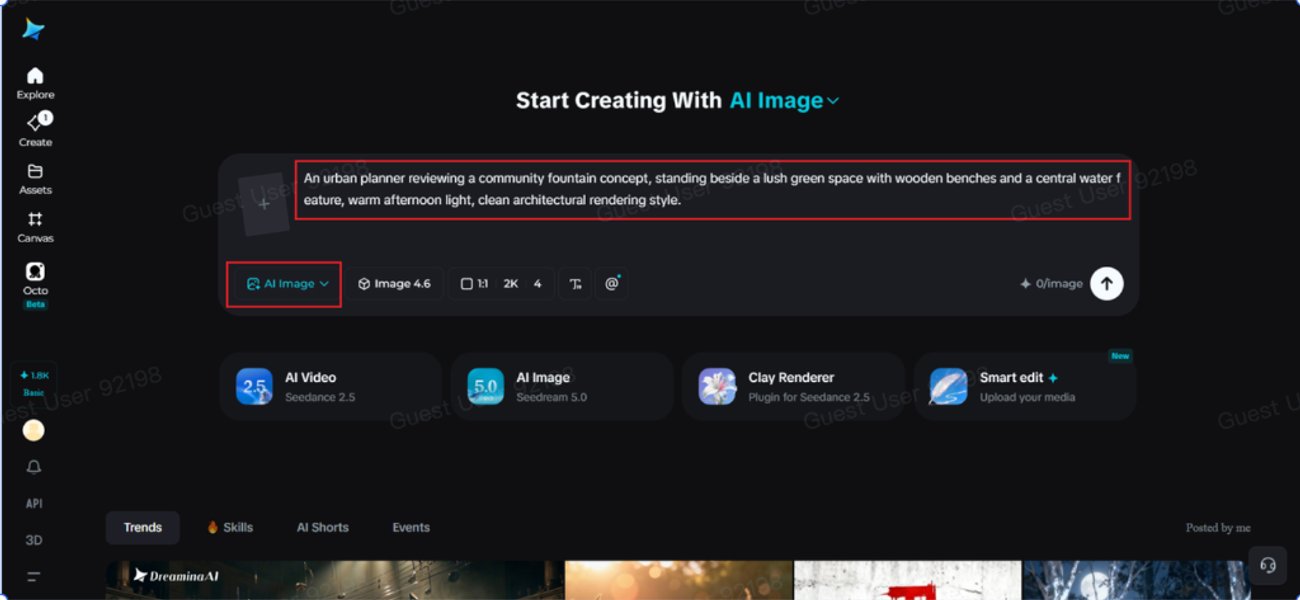
Navigate to Dreamina and draft a detailed prompt describing a subject dressed or positioned appropriately for your project's context, incorporating your chosen color palette, lighting, and environmental setting. If you have a rough sketch or reference photo capturing part of the vision, upload it alongside your text prompt for guided generation.
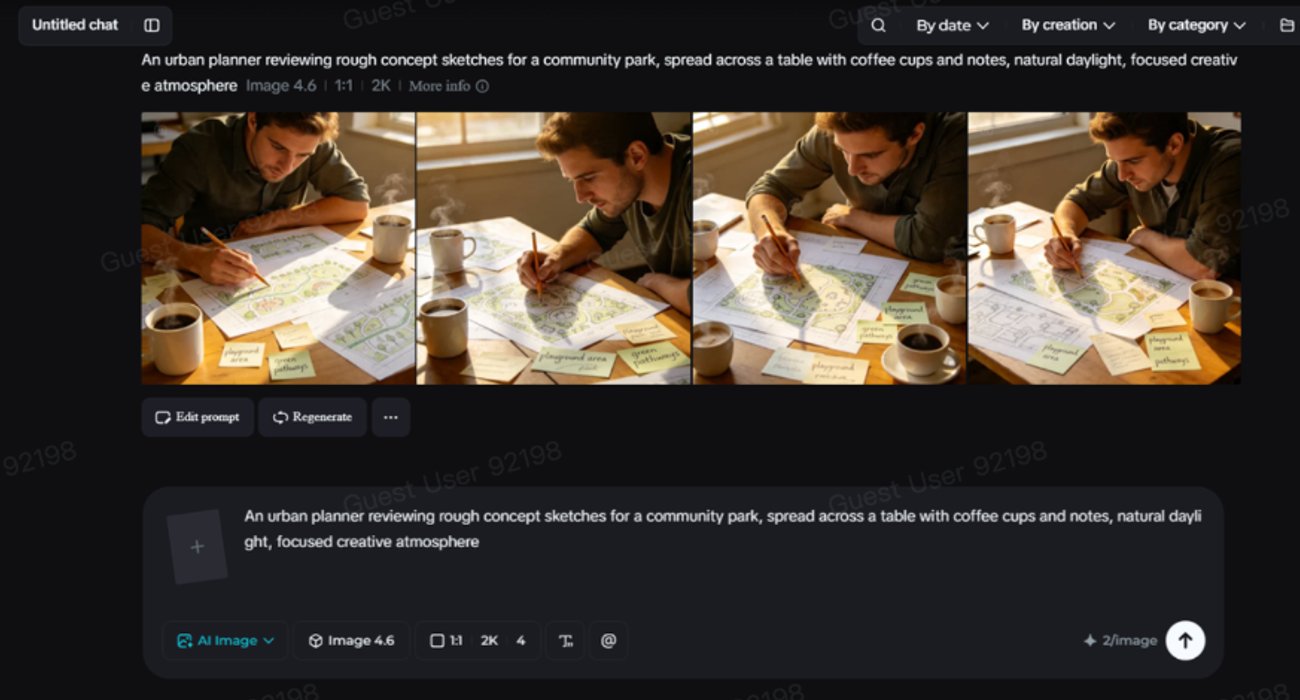
Sample Prompt: "An urban planner reviewing rough concept sketches for a community park, spread across a table with coffee cups and notes, natural daylight, focused creative atmosphere."
Step 2: Adjust Parameters and Generate
Select Image 5.0 Pro (powered by Seedream 5.0 Pro) as your model. Choose your aspect ratio, image size, and resolution—using 1K while exploring early directions and upgrading to 2K once you land on a concept worth polishing further. Click generate to produce your initial draft set.
Step 3: Customize and Export
Treat your initial output as a draft to refine. Use Dreamina's customization tools—inpaint to adjust specific regional details, expand to extend the camera angle, remove to eliminate unwanted background elements, and retouch to sharpen textures. When the visual feels complete, export your high-resolution asset.
Evaluating Your First AI Draft Objectively
After generating your first pass, pause before jumping straight into manual edits and ask:
- Does this capture the intended mood and lighting, even if small details are off?
- Is the composition working, or does the scene require a different perspective?
- Which specific elements are worth keeping versus regenerating?
Answering these questions saves time, as regenerating a stronger foundation is often faster than over-editing an flawed base image.
Knowing When a Rough Concept Is Finished
To avoid endless tweaking, use this practical completion checklist:
- The composition feels intentional and balanced.
- Lighting and color saturation are consistent across the entire frame.
- The core mood from your original brief is clearly present.
- No visual glitches or anatomical errors remain upon close inspection.
Once these criteria are met, additional edits usually yield diminishing returns.
Practical Applications Across Professional Workflows
This rough-to-polished workflow applies across creative and commercial industries:
- Concept Art: Creating early pitch visuals before project greenlights.
- Client Presentations: Translating abstract client requests into clear visual boards.
- Mood Board Synthesis: Combining multiple inspiration photos into a single hero image.
- Marketing Campaigns: Testing ad creative concepts prior to committing full photography budgets.
A rough idea is never as far from a finished graphic as it initially feels. With Dreamina and Seedream 5.0 Pro, creators have the reasoning tools to turn scattered ideas into polished visual assets.
Frequently Asked Questions
How does Seedream 5.0 Pro handle vague or rough prompts?
Seedream 5.0 Pro uses deep reasoning generation to infer composition, lighting, and thematic mood from loosely structured prompts, providing a balanced draft that can be refined with precise editing tools.
What is the difference between 1K and 2K resolution modes in Dreamina?
1K resolution is ideal for rapid exploration and testing early concept directions, while 2K resolution delivers crisp, production-grade output suitable for client presentations and final publishing.
Can I upload my own sketches or reference photos to guide AI image generation?
Yes. Dreamina allows users to upload reference images or rough hand-drawn sketches alongside text prompts to guide the AI on composition, subject placement, and color schemes.
Related Travel Guides
Disclaimer
This article is for informational and educational purposes only. It does not constitute legal, financial, or professional advice. While we strive to provide accurate and up-to-date information, travel policies, regulations, and conditions change rapidly. Always verify information with official sources before making travel decisions. Nomad Lawyer makes no representations about the accuracy, reliability, completeness, or suitability of the information provided. Readers should consult qualified professionals for advice specific to their circumstances. The views expressed in this article are those of the author and do not necessarily reflect the views of Nomad Lawyer.
Kunal K Choudhary
Co-Founder & Contributor
A passionate traveller and tech enthusiast. Kunal contributes to the vision and growth of Nomad Lawyer, bringing fresh perspectives and driving the community forward.
Learn more about our team →